
Bundle Magic: AI bundle builder and smart bundle suggestions for Shopify
Bundle Magic is a set of features that uses AI to intelligently create bundles
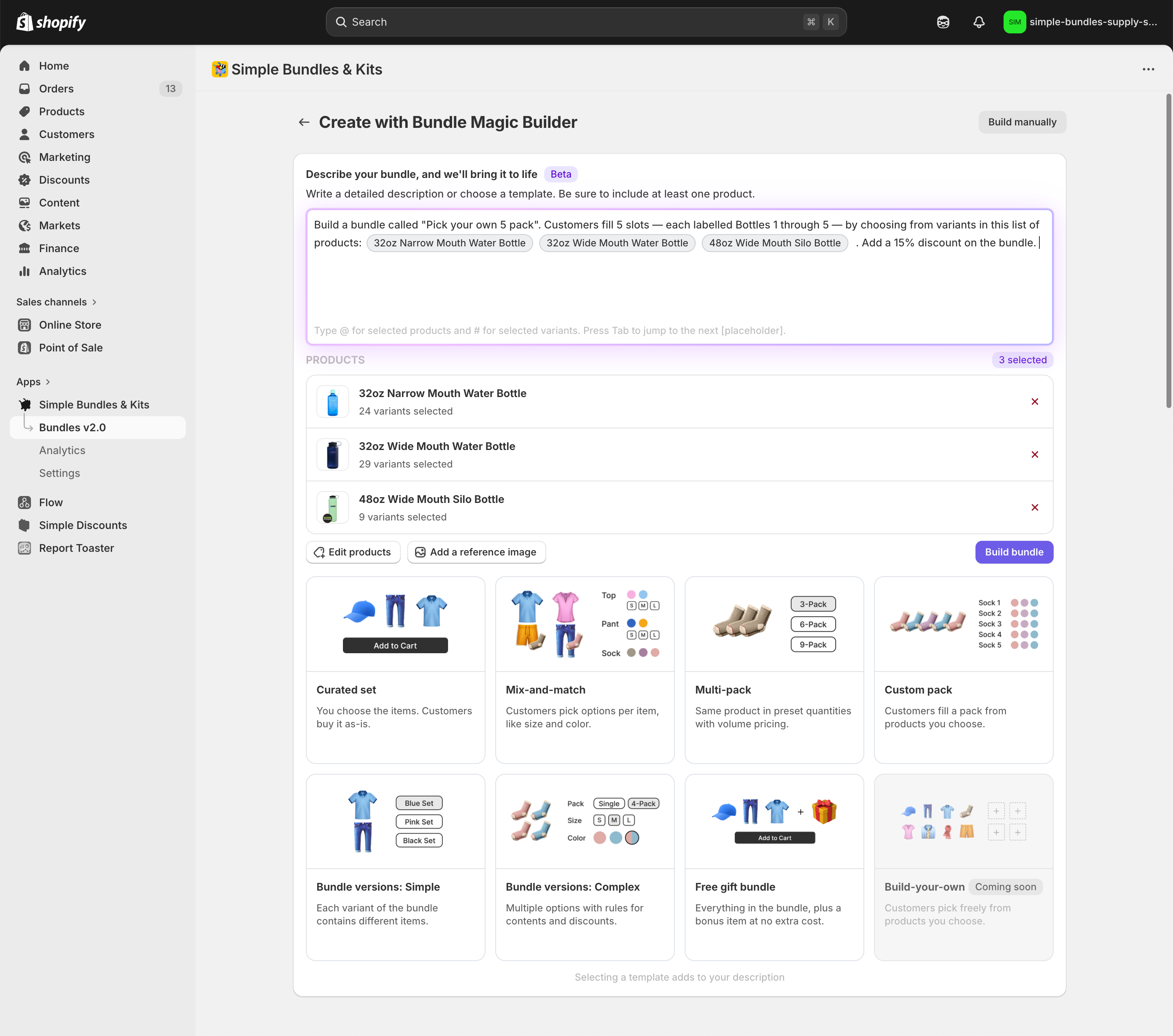
- Bundle Magic Builder: A bundle editor where you can describe the bundle you want to build and Simple Bundle builds it for you.
- Bundle Magic Suggestions: We create bundle suggestions based on your order history and or product catalogue. We also generate images and descriptions for you so those bundles are ready in just one click.
Bundle Magic Builder
Read: How to use the Bundle Magic Builder + example prompts
You can now generate product images directly from your bundle contents on the bundle details page. For full details, see How to generate images for your bundle using AI in Simple Bundles
Bundle Magic Builder is an AI-powered bundle editor that lets you describe the bundle you want and generates it for you. You can specify products or variants and attach reference images to guide how the bundle should be constructed.
To access Bundle Magic Builder, click “Build bundle” on your Dashboard or in the Bundles tab, then select “Build with Bundle Magic.”
A set of prewritten prompts is available to help you create specific types of bundles. You can edit these prompts freely to include any custom requirements or adjustments.
Steps
- Add a description: write your own or modify a bundle template
- Add products or variants and reference them in your description
- Add an image that clearly describes how you might want your bundle to look (Optional)
- Click "Build bundle"
- Review bundle status
- Your bundle will be set to Unlisted by default until you activate it.
- Larger bundles may take longer to process (up to 2 min). After clicking “Build bundle”, you’ll be redirected to the notifications center.
- The bundle will show as "In-progress", then update to "Complete" once finished.
- You can leave the page. You’ll be notified when the bundle is ready.
Bundle Magic Suggestions
Bundle Magic suggestions uses real purchase behavior from your store to suggest bundles. If there are insufficient orders, we use your product catalogue to generate bundle ideas with products that go well together.
You’ll see the Bundle Magic card on your Dashboard as soon as you install Simple Bundles. Bundle Magic is designed to help you launch bundles faster than ever using data you already have.

How Bundle Magic works
Bundle Magic automatically generates bundle suggestions that are likely to convert because they’re based on:
-
Your store’s order history
The system looks for items that are frequently purchased together.
-
AI-driven bundle recommendations
It also applies intelligence about which products typically make sense together in a bundle using your product catalogue, even beyond strict “bought together” patterns.
When Bundle Magic generates a bundle, it automatically creates:
- A bundle product in Shopify
- An AI-generated bundle title, bundle image (combining the recommended items into one cohesive image), bundle description, and bundle price
How Bundle Magic updates over time
Bundle Magic improves as your store collects more data. As orders roll in, Bundle Magic becomes more accurate and confident about:
- which products customers buy together
- which combinations might produce strong conversion as bundles
You’ll also see a “Last refreshed” date on the Bundle Magic card so you know when the suggestions were last updated.
How to add custom instructions to Bundle Magic suggestions
You can now personalize how the Bundle Magic agent generates bundle suggestions with a new customization setting. This allows you to fine-tune the instructions the agent follows, helping it better align with your merchandising strategy.
To add custom instructions, go to: Settings > Bundle Magic
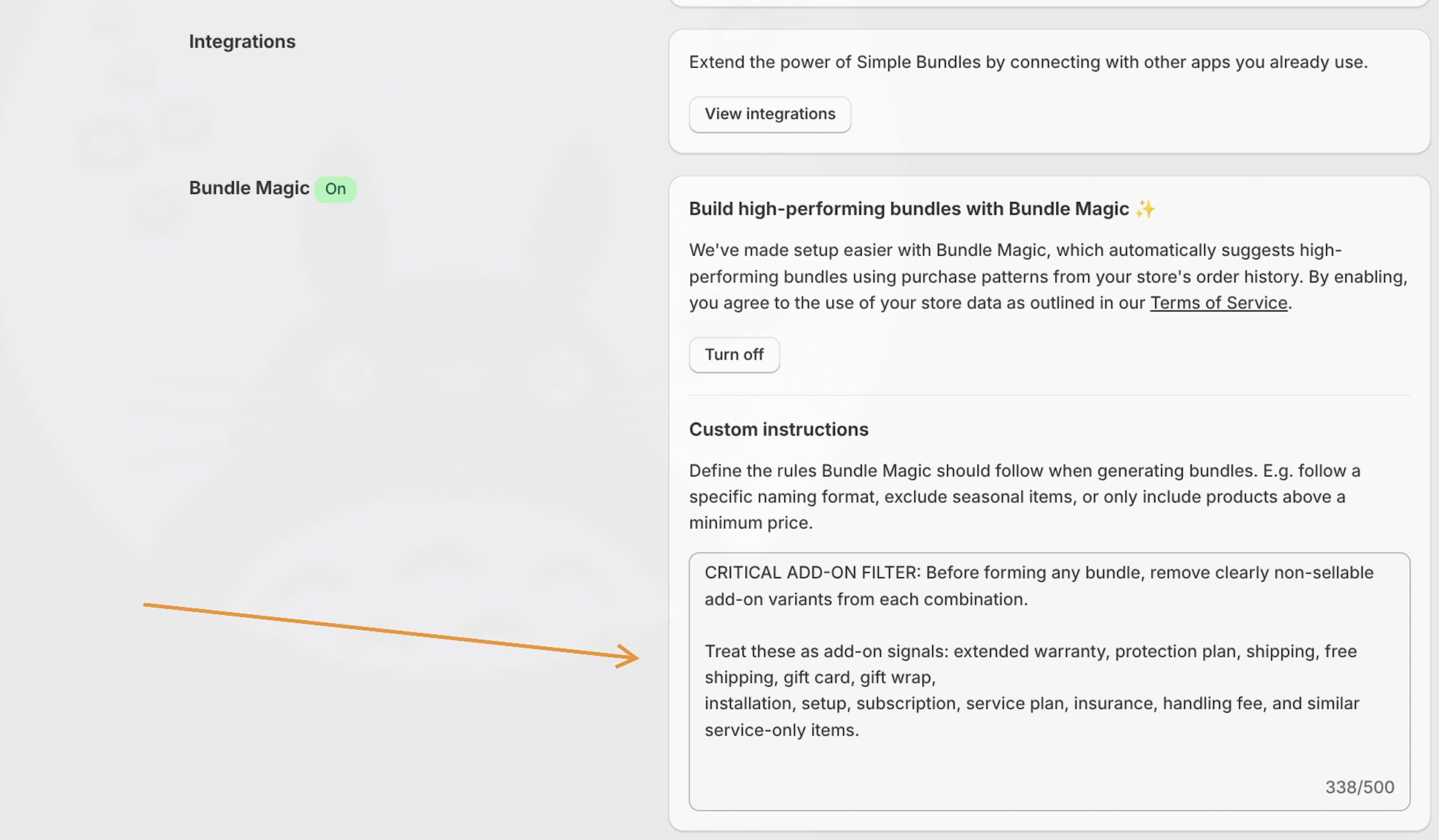
By default, your store will receive a recommended configuration that automatically excludes add-on products, such as warranties, free shipping items, and similar non-core products, from bundle suggestions. This helps ensure that generated bundles focus on your main sellable products.
If needed, you can adjust these instructions to better fit your specific product catalog and bundling goals.
What you’ll see inside the Bundle Magic card
Each suggestion includes a preview of a complete proposed bundle, including:
Bundle overview
- AI-generated bundle title
- Bundle price
- Any discount applied to the bundle (if included in the suggestion)
- An AI-generated bundle image
- A list of products included
This gives you visibility into what’s being generated before you create anything in Shopify.
What happens after you auto-generate a bundle
Once you click Auto-generate bundle, the bundle is created and saved as a an unlisted product in Shopify.
You’ll be able to:
- review it
- edit the title, price, description, images
- adjust product details
Please note that your bundle will not be live until you activate it
After the bundle is generated, you’ll need to go into Shopify and set the product status to Active. If you don’t do this, the product will remain unlisted and won’t be visible to customers.
What if you don’t have enough order history yet?
If your store doesn’t have sufficient data (for example, you installed Simple Bundles before you had many orders), Bundle Magic will show suggestions based on your product catalogue. Once more orders are placed and the store has meaningful history, suggestions will begin to appear automatically.
Best practices: Get the most out of Bundle Magic
If you want Bundle Magic to help you create high-performing bundles quickly, here’s what works:
1) Start with your strongest repeat purchase patterns
Bundle Magic will typically surface bundles based on what your customers already buy together. These are often the easiest wins.
2) Generate, then review before activating
Bundle Magic generates a ready-to-sell product, but you should still:
- check the product title
- confirm pricing
- ensure imagery matches your brand tone
- refine the description if needed
3) Activate when you’re ready to sell
Your bundle won’t go live until you mark it active in Shopify. Use that draft stage to polish and approve it.
FAQ
Does Bundle Magic change my store automatically?
No. Bundle Magic only creates a bundle when you click Auto-generate bundle. Suggestions refresh automatically, but nothing is created until you choose to generate it. After you generate it, the bundle product is set as Unlisted and only visible to customers if you set the product as Active.
Can I edit the generated bundle?
Yes. Bundles generated through Bundle Magic are fully editable in Shopify and in Simple Bundles after they’re created.
Can I use an existing Shopify product as the parent bundle?
No. Bundle Magic always creates a new product to act as the parent bundle when you generate a bundle, whether through Bundle Magic Builder or Bundle Magic Suggestions. It can't attach a bundle to an existing product you already have in Shopify. If you'd like to build a bundle using an existing product as the parent, you'll need to set that up manually in Simple Bundles instead.
Are the bundle images and descriptions really auto-generated?
Yes. Bundle Magic generates:
- a combined bundle image that visually groups the products into one cohesive image
- a product description directly on Shopify
- a bundle title and price
If you don’t have enough data yet, Bundle Magic will begin generating suggestions automatically as soon as your store has more meaningful orders.