
Edit bundle details from Shopify product and variant pages
This article applies to Simple Bundles 1.0 and 2.0.
You can open any bundle in Simple Bundles straight from its Shopify product or variant page. Simple Bundles adds an Edit bundle in Simple Bundles option to the More actions menu, so you can find a bundle in your Shopify admin and jump to its edit page in the app.
How do I edit a bundle from its Shopify product page?
Note: The product or variant must already be set up as a bundle in Simple Bundles. If it isn't, the app opens its home page with a "Bundle not found" message.
- In your Shopify admin, go to the bundle's product page or variant page.
- Click More actions.
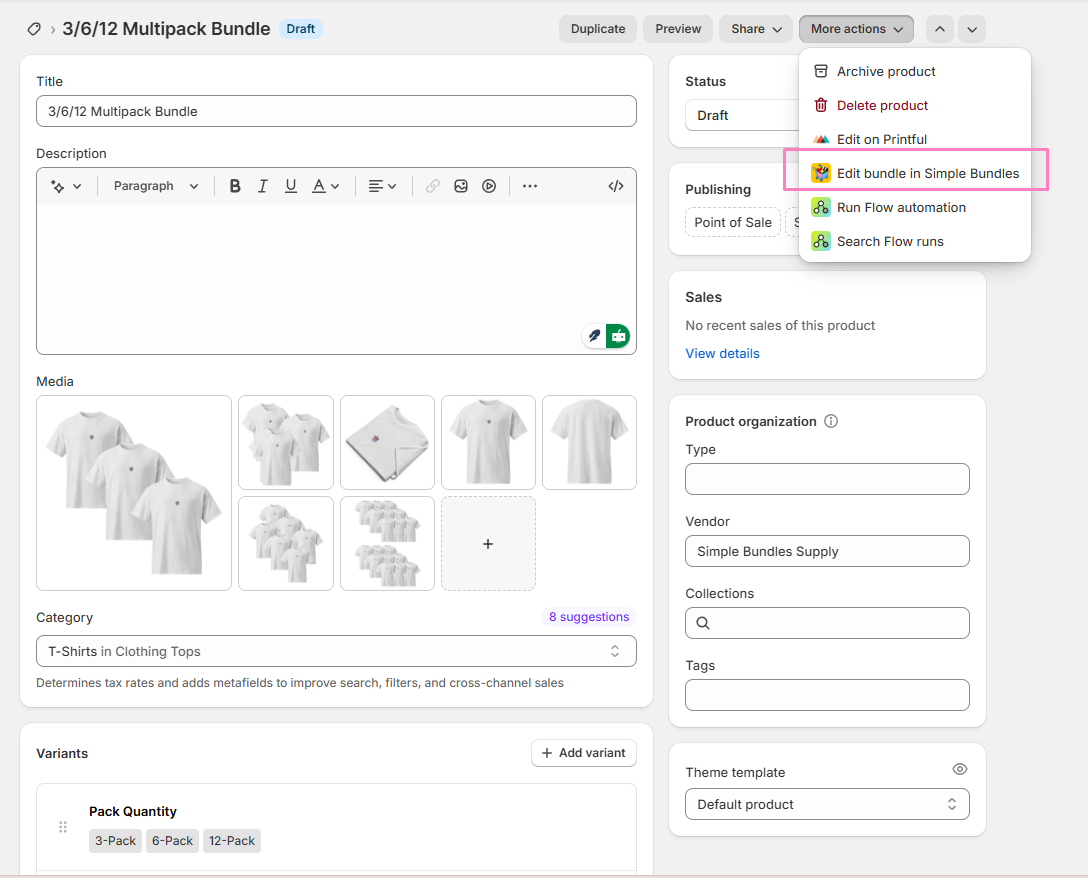
- Click Edit bundle in Simple Bundles. The bundle opens in the app: in the 1.0 bundle builder on Simple Bundles 1.0, or the 2.0 bundle editor on Simple Bundles 2.0.
From the product page, the link opens the first bundle variant on that product. To open a specific bundle variant, start from that variant's page.